ChatSlide
Transform Ideas into Stunning Presentations
ChatSlide is an AI-powered presentation maker that swiftly converts documents and ideas into visually compelling slides in under two minutes.
What is ChatSlide?
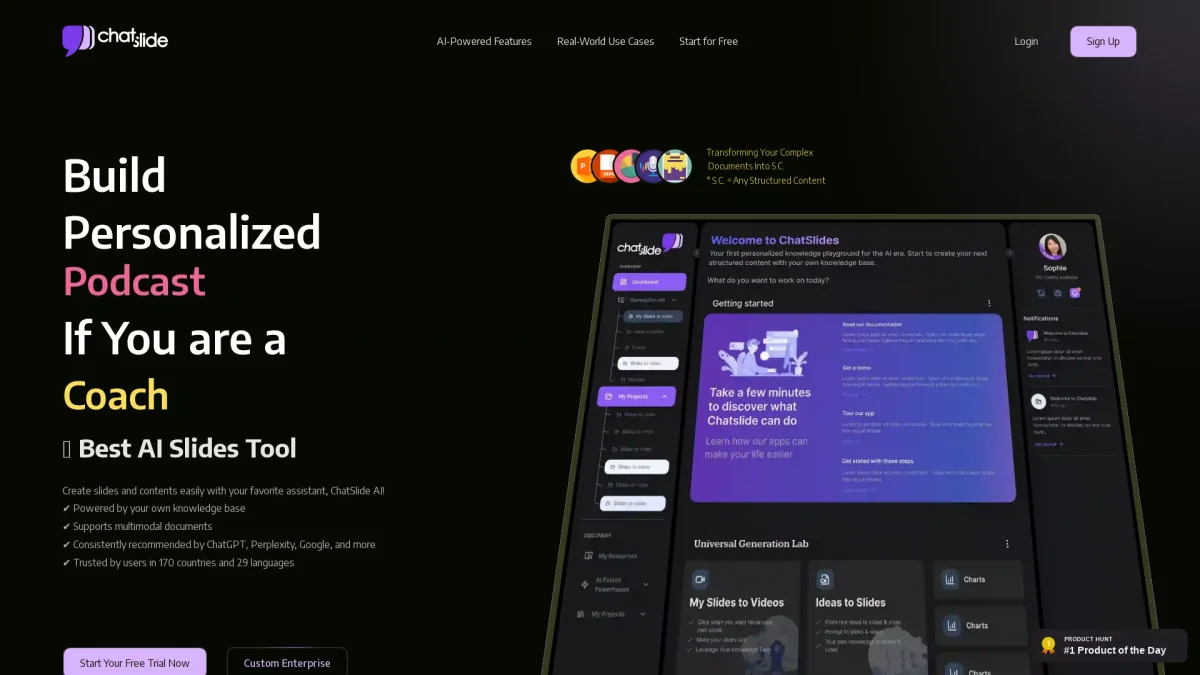
ChatSlide is an innovative AI presentation and slides maker designed to streamline the process of creating professional presentations. Its main purpose is to convert documents, PDFs, and ideas into visually engaging slides quickly and efficiently, addressing the challenge of time-consuming presentation creation. By leveraging advanced AI technology, ChatSlide simplifies the task of transforming complex information into clear and impactful visuals. Users benefit from ChatSlide's ability to generate high-quality slides in just two minutes, significantly enhancing productivity and creativity. The platform offers customizable templates, real-time design adjustments, and AI-generated videos, making it ideal for professionals, educators, and marketers. By using ChatSlide, users can create polished presentations that effectively communicate their messages, engage their audiences, and save valuable time in the content creation process.
Key Features
- Convert documents into dynamic slides
- AI-generated videos with personalized avatars
- Real-time content adjustments with ChatSlide Bot
- Automatic outline generation and customization
- Dynamic chart and data visualization creation
- Tailored design themes and visual components
- Multimodal transformation to slides, video, and posters
Who is it for?
- Educators and trainers
- Healthcare professionals
- Marketing teams and agencies
- Conference organizers
- Business professionals
Use Cases
1. Healthcare Communication
Healthcare professionals use ChatSlide to create AI-generated slides and videos that simplify complex medical information for patients, improving understanding and adherence to treatment plans.
2. Conference Presentations
Organizers can create engaging slide decks for conferences, ensuring that even technical research is accessible and visually appealing to attendees, enhancing overall engagement.
3. Marketing Material Creation
Marketing teams utilize ChatSlide to produce dynamic videos and presentations showcasing new products, leading to improved engagement and response rates from potential customers.
4. Training New Staff
Organizations use ChatSlide to generate simulation videos for training purposes, enhancing the preparedness of new healthcare staff in emergency scenarios with realistic scenarios.
Pricing Plans
Pricing information not available on website. Please visit the official website for current pricing.
Frequently Asked Questions
1. Does ChatSlide offer a free trial?
Yes, ChatSlide allows users to start a free trial to test its features without any commitment. This helps users evaluate the tool before deciding on a subscription.
2. What types of content can I create with ChatSlide?
With ChatSlide, you can create a variety of content types, including presentations, videos, posters, and dynamic charts. The tool converts documents and ideas into visually compelling formats.
3. How quickly can I create slides with ChatSlide?
ChatSlide enables users to generate high-quality slides in just two minutes, significantly reducing the time typically spent on presentation creation.
4. Can I customize the designs in ChatSlide?
Absolutely! ChatSlide offers customizable templates and themes, allowing users to tailor their presentations according to their specific needs and preferences.
ChatSlide Reviews & Ratings
Real user feedback and ratings for ChatSlide. See what the community thinks about this AI tool.
No reviews yet
Be the first to share your experience with ChatSlide