
Audo Studio
One Click Audio Cleaning Made Easy
Audo Studio automatically removes background noise and enhances audio quality, making your recordings sound professional in just seconds.
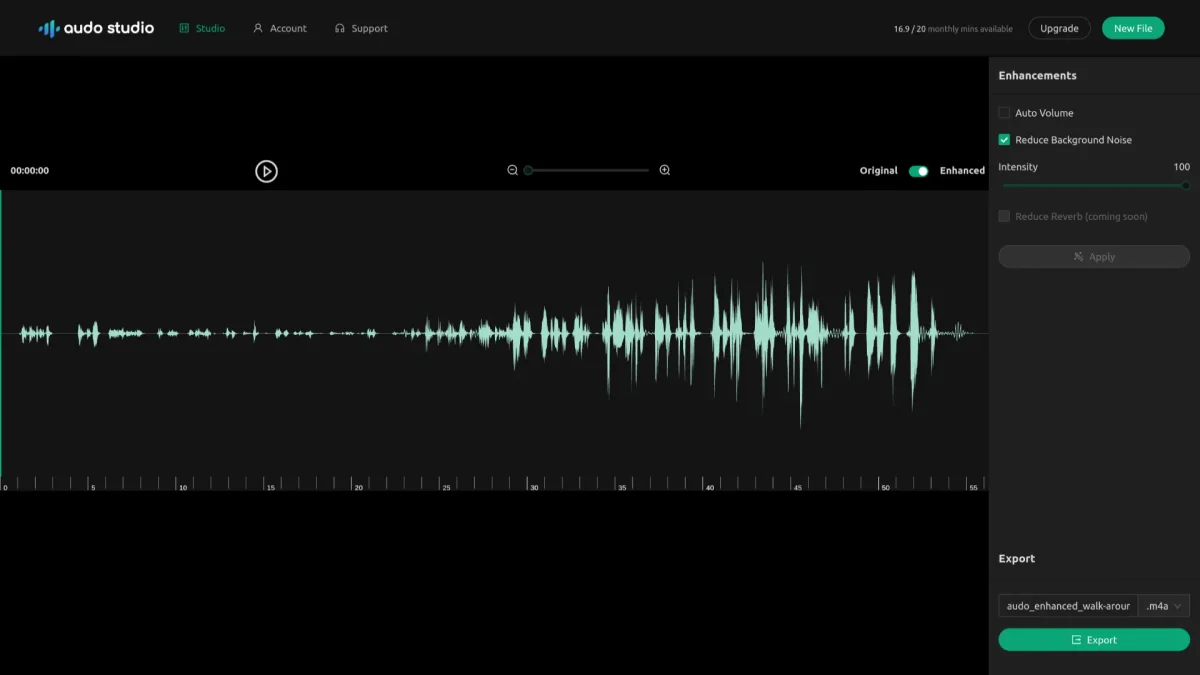
What is Audo Studio?
Audo Studio is an innovative audio cleaning tool that leverages advanced artificial intelligence to automatically enhance your audio recordings. Its main purpose is to simplify the audio editing process by eliminating background noise, reducing echoes, and adjusting volume levels, allowing users to achieve clean, high-quality audio without the need for extensive manual editing. The key benefits of Audo Studio include speed, ease of use, and high-quality results. Users can clean their audio in seconds rather than hours, making it perfect for podcasters, video creators, and online course developers. By streamlining the audio enhancement process, Audo Studio helps users focus on content creation while ensuring their audio remains clear and professional, enhancing the overall listener experience.
Key Features
- One-click background noise removal
- Automatic volume adjustment
- Echo reduction (coming soon)
- Fast audio cleaning process
- User-friendly interface
- Supports various audio formats
Who is it for?
- Podcasters and content creators
- YouTube video producers
- Online course instructors
- Musicians and audio engineers
Use Cases
1. Podcast Production
Podcasters can use Audo Studio to clean their audio files by removing background noise and enhancing voice clarity, ensuring a professional sound that engages listeners without distractions.
2. YouTube Video Creation
YouTube creators can enhance their video audio quality by applying Audo Studio's noise removal and volume adjustment features, resulting in a polished final product that improves viewer retention.
3. Online Course Development
Instructors can improve the audio quality of their course materials by using Audo Studio to eliminate distracting sounds, providing students with a clearer and more focused learning experience.
4. Music Recording
Musicians can utilize Audo Studio to clean up their recordings by removing unwanted background noise and optimizing sound levels, allowing for a more professional final mix.
Pricing Plans
Free: 20 minutes of audio enhancement per month, Creator: $12/month - 600 minutes of audio enhancements per month, Pay As You Go: $20 - One-time payment for 600 additional minutes.
Frequently Asked Questions
1. Does Audo Studio offer a free plan?
Yes, Audo Studio provides a free plan that includes 20 minutes of audio enhancement per month, allowing users to try out the service without any cost.
2. What features are included in the Creator plan?
The Creator plan includes all available features, offering 600 minutes of audio enhancements per month for a subscription fee of $12, which is currently discounted.
3. How does Audo Studio compare to Adobe Audition?
Audo Studio is designed to be 10 times faster than Adobe Audition, providing an easier and quicker solution for background noise removal and audio enhancement with one-click functionality.
4. Can I use Audo Studio on any operating system?
Yes, Audo Studio is a browser-based tool, which means it is compatible with any operating system, including Mac, Windows, and Linux, allowing users to access it from any device with internet connectivity.
Audo Studio Reviews & Ratings
Real user feedback and ratings for Audo Studio. See what the community thinks about this AI tool.
No reviews yet
Be the first to share your experience with Audo Studio