
Audioalter
Transform your audio with powerful effects
Audioalter offers a suite of online audio tools to modify, enhance, and transform audio files effortlessly, catering to musicians, content creators, and hobbyists alike.
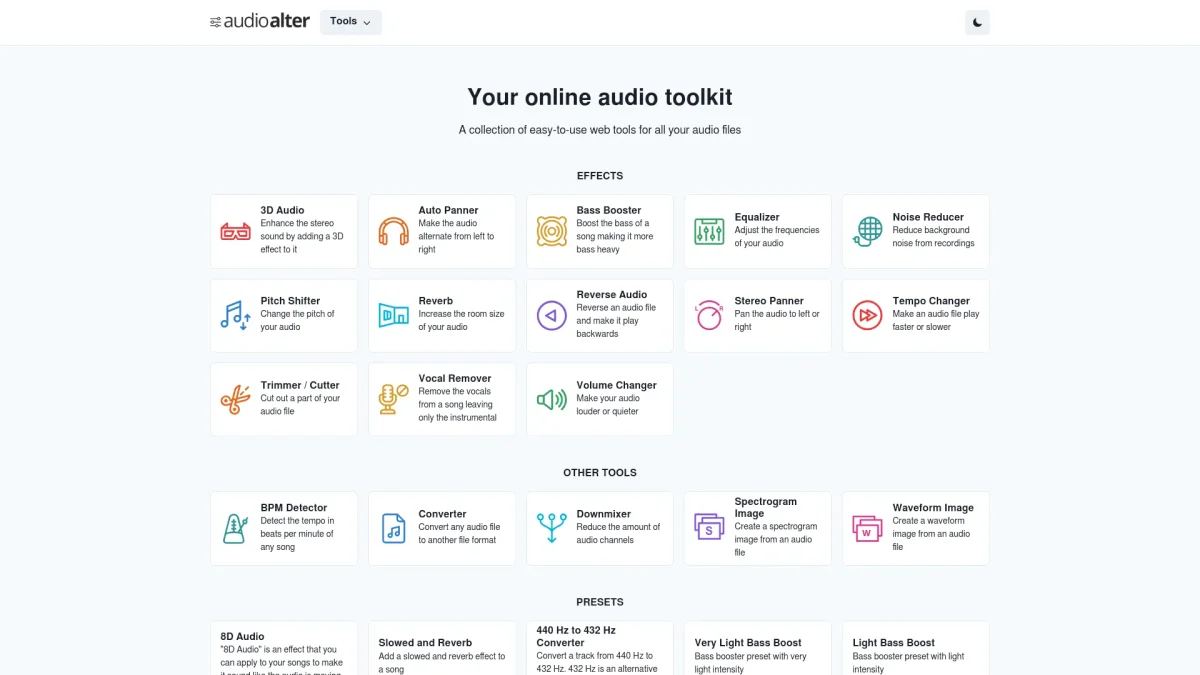
What is Audioalter?
Audioalter is an online platform designed to provide various audio editing tools that allow users to enhance, modify, and transform their audio files with ease. It addresses the challenges of audio editing by offering user-friendly tools that simplify complex processes, making audio editing accessible to everyone, regardless of their technical expertise. The key benefits of using Audioalter include a wide range of features like audio effects, file conversion, and vocal removal, all available online without the need for software installation. Users can quickly apply changes to their audio files, resulting in a more efficient workflow for musicians, podcasters, and anyone needing quality audio enhancements. Its intuitive interface ensures that anyone can create professional-sounding audio without extensive knowledge of audio editing software.
Key Features
- Vocal remover for karaoke tracks
- Audio speed adjustment
- Pitch changer for voice modulation
- Audio format converter
- Online audio editor
- Background noise removal
- Reverb and echo effects
Who is it for?
- Musicians and bands
- Podcasters and content creators
- Audio engineers and producers
- Students and educators
- Hobbyists and enthusiasts
Use Cases
1. Creating Karaoke Tracks
Use the vocal remover feature to create karaoke versions of your favorite songs. Simply upload the track, and Audioalter will extract the vocals, leaving you with just the instrumental to sing along.
2. Podcast Editing
Enhance your podcast audio quality by using various tools like background noise removal and pitch adjustment. This ensures clear and professional-sounding episodes for your listeners.
3. Music Production
Musicians can utilize Audioalter to modify their tracks by adding effects like reverb and echo, or by adjusting the speed and pitch of their recordings to achieve the desired sound.
4. Audio Format Conversion
Easily convert audio files into different formats to ensure compatibility with various devices and platforms. Audioalter supports multiple formats, making it a versatile tool for any audio project.
5. Sound Design for Videos
Video creators can enhance their projects by adjusting audio tracks, adding effects, or removing unwanted sounds. This helps create a polished final product that elevates the overall quality of the video.
Pricing Plans
Pricing information not available on website. Please visit the official website for current pricing.
Frequently Asked Questions
1. What audio formats does Audioalter support?
Audioalter supports a variety of audio formats including MP3, WAV, and more. This allows users to upload and convert files in their preferred format without compatibility issues.
2. Can I use Audioalter for commercial projects?
Yes, Audioalter can be utilized for both personal and commercial projects, making it a suitable choice for professionals in music and audio production seeking reliable editing tools.
3. Is there a limit on file sizes for uploads?
Audioalter may have specific limitations on the size of audio files that can be uploaded, depending on the tool used. Users are encouraged to check the guidelines on the website for detailed information.
4. Do I need to create an account to use Audioalter?
No, you do not need to create an account to use Audioalter. The platform allows users to access its tools directly without the need for registration, making it convenient for quick edits.
Audioalter Reviews & Ratings
Real user feedback and ratings for Audioalter. See what the community thinks about this AI tool.
No reviews yet
Be the first to share your experience with Audioalter