
Selects
Streamline Your Video Editing Process
Selects by Cutback revolutionizes video editing, transforming hours of preparation into minutes so creators can focus on storytelling and creativity.
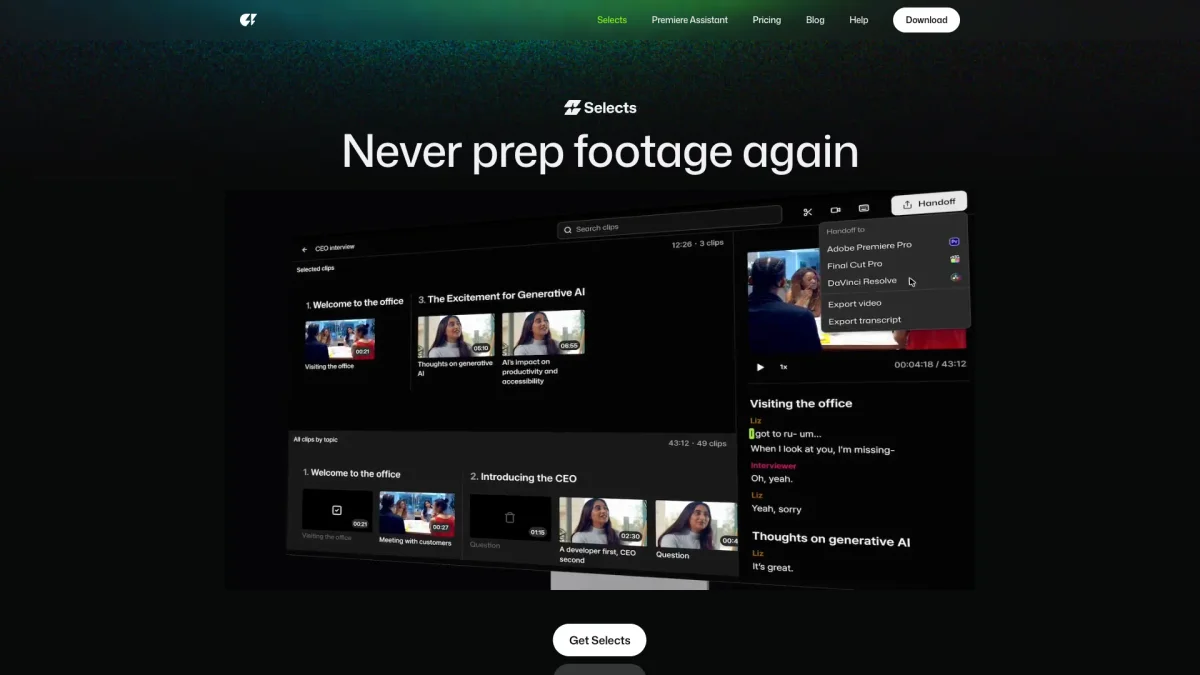
What is Selects?
Selects is an AI-driven tool designed for long-form video content, significantly reducing the time required for video preparation and editing. By automating the organization, syncing, and initial cuts of raw footage, Selects allows video editors to start the creative process without the lengthy prep work typically involved in editing sessions. With features like automatic multi-cam syncing, topic organization, and the ability to cut unnecessary parts with a click, Selects enhances editing efficiency. This tool is ideal for content creators across various platforms, including podcasts and documentaries, helping them save time and effort while achieving polished results ready for sharing or further editing in professional software like Adobe Premiere Pro, Final Cut, or DaVinci Resolve.
Key Features
- Auto prep and edit in minutes
- Pro-grade multi-cam sync
- Smart stringout by topics
- Instant editing instructions
- Non-destructive editing control
- Seamless NLE handoff
- Cut unnecessary parts easily
Who is it for?
- Video editors and producers
- Content creators on YouTube
- Podcast producers and hosts
- Documentary filmmakers
- Event videographers
Use Cases
1. Podcast Editing
Transform lengthy podcast recordings into concise, engaging episodes in minutes. Selects organizes and cuts the footage based on topics, allowing you to focus on the content rather than the editing process.
2. Vlog Production
Streamline your vlog production by quickly syncing multiple camera angles and cutting unnecessary footage. Selects allows you to create polished, engaging vlogs efficiently, saving valuable time.
3. Documentary Filmmaking
In the world of documentary filmmaking, Selects helps you manage extensive footage by automatically organizing it by scene and topic, simplifying the editing process and enhancing storytelling.
4. Livestream Highlights
Capture the best moments from livestreams with ease. Selects allows you to quickly edit and share highlights, making it simple to engage your audience post-event.
5. Educational Content Creation
Create educational videos efficiently by using Selects to organize and refine your footage. Whether it's lectures or tutorials, this tool helps you craft content that resonates with learners.
Pricing Plans
Pricing information not available on website. Please visit the official website for current pricing.
Frequently Asked Questions
1. Does Selects offer a free trial?
Yes, Selects provides a 7-day free trial, allowing users to test the features and functionalities before committing to a subscription.
2. Can I use Selects for short-form content?
Absolutely! While Selects is optimized for long-form video, it also supports short-form content editing, making it versatile for various projects.
3. How does Selects integrate with other editing software?
Selects seamlessly hands off project files to popular editing software like Adobe Premiere Pro, Final Cut Pro, and DaVinci Resolve, ensuring compatibility with existing workflows.
4. What types of projects can I use Selects for?
Selects is ideal for a variety of projects, including podcasts, vlogs, documentaries, talk shows, and educational content, making it a versatile tool for video creators.
Selects Reviews & Ratings
Real user feedback and ratings for Selects. See what the community thinks about this AI tool.
No reviews yet
Be the first to share your experience with Selects