ImgToImg
Effortless image transformation with AI
Transform your images with advanced AI technology, allowing for creative variations while maintaining the original structure and quality.
What is ImgToImg?
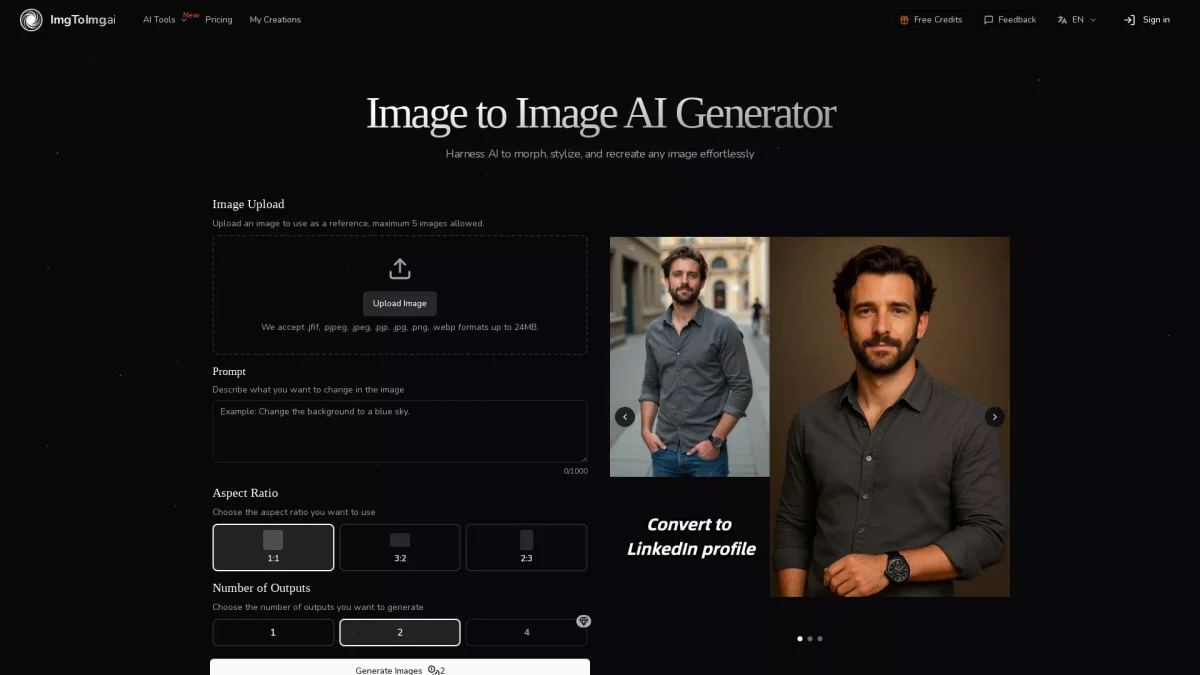
ImgToImg is an innovative AI image generator designed to transform existing images into unique variations by applying user-defined modifications. Its main purpose is to enhance creativity by preserving the core structure of the original image while allowing for artistic changes. This tool is particularly useful for designers and marketers who need to visualize concepts or create multiple variations of visual assets efficiently. Users benefit from ImgToImg's fast processing capabilities, enabling them to generate multiple high-quality images in seconds. The platform provides exceptional control over the transformation process, allowing for versatile applications of artistic styles and modifications. Whether you are a creative professional or an enthusiast, ImgToImg empowers you to experiment with visual ideas without requiring extensive design skills, making image transformation accessible to everyone.
Key Features
- Maintain original image structure
- Fast and efficient processing
- Versatile style applications
- High-resolution outputs
- User-friendly interface
- Supports multiple image formats
- Customizable aspect ratios
Who is it for?
- Graphic designers
- Digital marketers
- Creative enthusiasts
- Social media managers
- Content creators
Use Cases
1. Concept Visualization
Designers can upload initial concepts and describe desired changes, allowing ImgToImg to generate multiple variations for client presentations or brainstorming sessions, enhancing visual communication.
2. Marketing Asset Creation
Marketers can quickly create diverse visuals for campaigns by transforming existing images. This helps in maintaining brand consistency while exploring different styles and formats for advertisements.
3. Artistic Style Experimentation
Artists can use ImgToImg to experiment with various artistic styles by simply uploading an image and describing the style they wish to apply, allowing for creative exploration without extensive manual effort.
4. Social Media Content Development
Content creators can produce engaging social media graphics by transforming images to fit specific themes or aesthetics, ensuring their posts stand out in crowded feeds.
Pricing Plans
Pricing information not available on website. Please visit the official website for current pricing.
Frequently Asked Questions
1. What types of images work best with ImgToImg?
The best results come from clear, well-lit images with defined subjects. Using images that match your desired output aspect ratio will also enhance transformation quality.
2. How does ImgToImg differ from text-to-image generation?
ImgToImg uses existing images as a starting point, maintaining their core structure while applying transformations. In contrast, text-to-image generation creates entirely new images from scratch.
3. Can I generate multiple outputs at once?
Yes, ImgToImg allows you to choose the number of outputs you want to generate, giving you multiple variations to select from, which is ideal for creative exploration.
4. What file formats does ImgToImg support?
ImgToImg supports various image formats including .jpeg, .jpg, .png, and .webp, with an upload limit of 24MB per image, accommodating a wide range of user needs.
ImgToImg Reviews & Ratings
Real user feedback and ratings for ImgToImg. See what the community thinks about this AI tool.
No reviews yet
Be the first to share your experience with ImgToImg