Img Editor
Create stunning images with AI technology
Img Editor transforms your ideas into beautiful AI-generated images quickly and efficiently, making digital art creation accessible to everyone.
What is Img Editor?
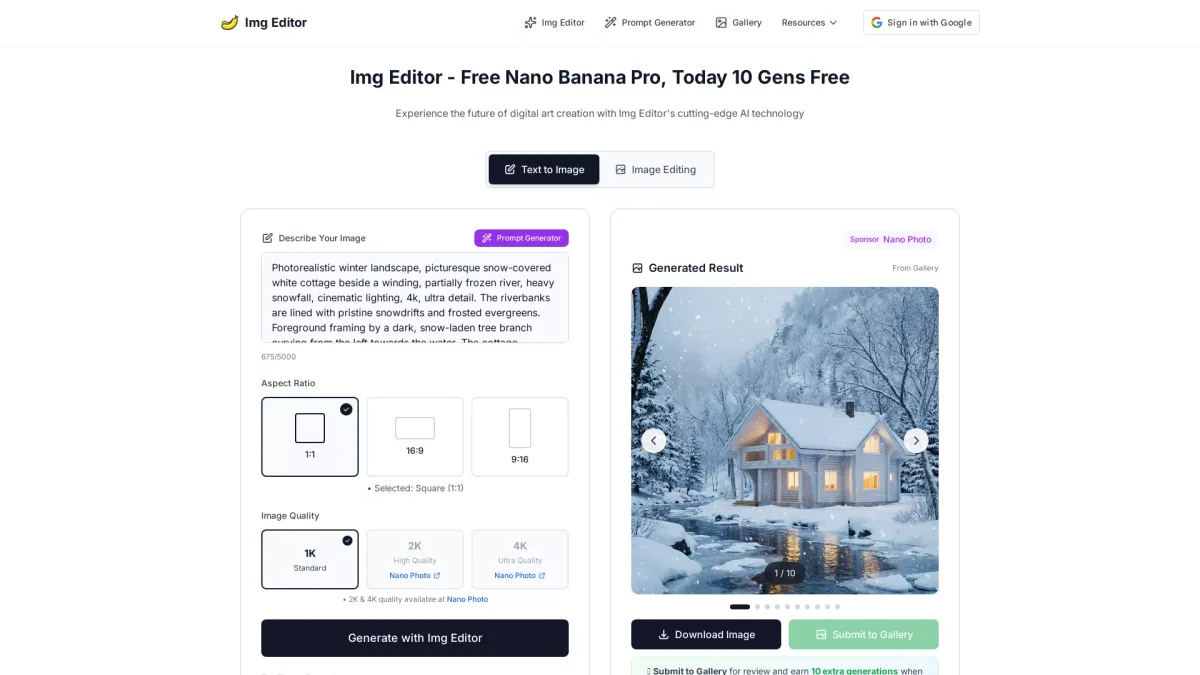
Img Editor is an innovative AI-powered image generation tool designed to help users create professional-grade images effortlessly. Its primary function is to understand user prompts and translate them into stunning visual artwork, solving the challenge of generating high-quality images without requiring advanced artistic skills. Img Editor leverages cutting-edge AI technology to ensure users can bring their creative visions to life in just moments. The tool offers numerous benefits, including lightning-fast image generation, ultra-high-quality outputs, and advanced style customization options. Users can experiment with various artistic styles or let the AI choose the best fit, maximizing their creative potential. By simplifying the image creation process, Img Editor empowers content creators, designers, and enthusiasts to produce captivating artwork swiftly, enhancing productivity and inspiring creativity in any project.
Key Features
- Lightning-fast image generation
- Ultra-high quality output
- Advanced style customization
- Intelligent batch processing
- User-friendly interface
- Prompt generator for creativity
- Multiple resolution options
Who is it for?
- Graphic designers
- Digital artists
- Content creators
- Marketing professionals
- Social media managers
Use Cases
1. Social Media Content Creation
Create eye-catching visuals for your social media posts in seconds. Img Editor allows you to generate images that resonate with your audience, enhancing engagement and improving your brand's online presence.
2. Marketing Campaign Graphics
Design professional-grade images for marketing materials. Img Editor enables marketers to produce high-quality visuals for ads, brochures, and promotional content quickly, saving time and resources.
3. Digital Art and Illustrations
Generate unique digital art pieces effortlessly. Whether you're an aspiring artist or a seasoned professional, Img Editor provides the tools to explore your creativity and produce stunning illustrations.
4. Website and Blog Graphics
Enhance your website or blog with custom graphics. Img Editor helps content creators generate relevant images that complement their written content, improving visual appeal and user engagement.
5. Creative Project Mockups
Create visual mockups for various projects effortlessly. Img Editor's AI capabilities allow you to quickly generate mockups that showcase your ideas, making it easier to present concepts to clients or stakeholders.
Pricing Plans
Free: Basic features with limited image generations, Pro: $X/month - Enhanced features and faster generation speeds, Enterprise: Custom pricing - Tailored solutions for teams and organizations.
Frequently Asked Questions
1. What types of images can I create with Img Editor?
Img Editor allows users to create a wide range of images, from realistic landscapes and fantasy illustrations to abstract art and social media graphics. The tool responds to detailed prompts to generate various styles.
2. Is there a limit to how many images I can generate?
Yes, the free plan offers a limited number of generations, while the Pro plan provides additional generations and faster processing. Users can also earn extra generations by submitting their creations to the gallery.
3. Can I customize the style of the images I create?
Absolutely! Img Editor offers hundreds of artistic styles to choose from, or you can create your own unique aesthetic using advanced controls, ensuring your images align with your vision.
4. How does Img Editor handle image quality?
Img Editor generates images in various resolutions, including 1K, 2K, and 4K options. This flexibility allows users to choose the quality that best suits their needs for different projects.
Img Editor Reviews & Ratings
Real user feedback and ratings for Img Editor. See what the community thinks about this AI tool.
No reviews yet
Be the first to share your experience with Img Editor