DocGPT
Transform PDFs into interactive conversations
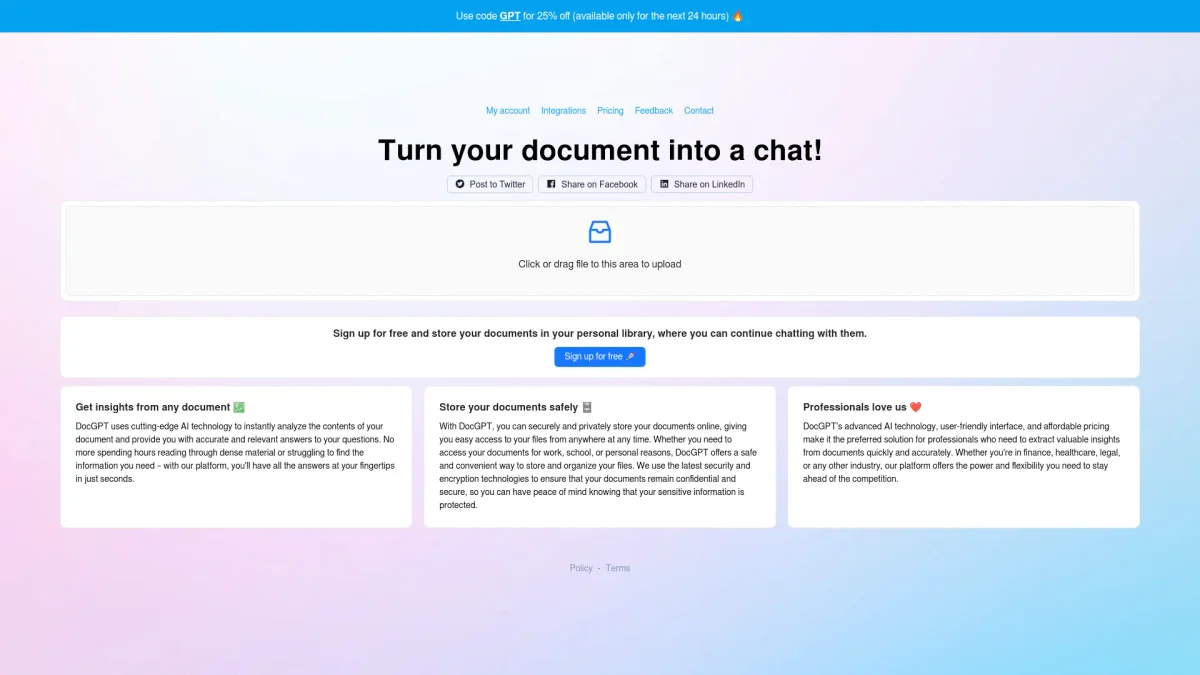
DocGPT allows you to chat with your PDF documents, extracting summaries and answers effortlessly, making static content dynamic and engaging.
What is DocGPT?
DocGPT is a cutting-edge tool designed to facilitate interactive communication with PDF documents. Its primary purpose is to transform static PDFs, such as legal agreements and financial reports, into dynamic conversations that users can engage with directly. By enabling users to upload documents and ask questions about their content, DocGPT addresses the challenge of quickly extracting relevant information from lengthy and complex files. Users benefit from DocGPT's ability to provide instant answers, summaries, and information extraction, all backed by sources from the uploaded documents. This innovative approach streamlines the PDF experience, making it easier for professionals to analyze and understand critical information. With over 8,000 satisfied users, DocGPT is an invaluable tool for those looking to enhance productivity and simplify the management of important documents.
Key Features
- Chat with multiple PDFs
- Instant answers and summaries
- Source-backed responses
- User-friendly document upload
- Supports various document types
- Affordable pricing options
Who is it for?
- Legal professionals
- Financial analysts
- Researchers and academics
- Business executives
- Students and educators
Use Cases
1. Legal Document Review
Legal professionals can upload contracts and agreements to DocGPT, enabling them to ask specific questions about clauses, terms, and conditions, streamlining the review process.
2. Financial Report Analysis
Analysts can upload financial reports to quickly extract key figures and insights. This helps in making informed decisions based on summarized data without reading entire documents.
3. Academic Research Assistance
Students and researchers can upload academic papers, asking DocGPT for summaries or clarifications on specific sections, enhancing their understanding of complex material.
4. User Manual Interaction
Product managers can upload user manuals to facilitate quick Q&A sessions, allowing customers or team members to find information on product usage without sifting through documents.
Pricing Plans
Pricing information not available on website. Please visit the official website for current pricing.
Frequently Asked Questions
1. Can I chat with multiple PDF documents at once?
Yes, DocGPT allows you to chat with multiple PDFs simultaneously, making it easy to gather information from different documents in one session.
2. What types of documents can I upload?
You can upload various PDF documents, including legal agreements, financial reports, scientific papers, user manuals, and employee training documents.
3. How does DocGPT provide answers to my questions?
DocGPT uses advanced AI to analyze the content of uploaded PDFs and provides instant answers, summaries, and information extraction, all backed by the sources from the documents.
4. Is there a limit to the size of PDFs I can upload?
The website does not specify size limits for PDF uploads. However, it’s best to check the official site for any guidelines regarding document size and performance.
DocGPT Reviews & Ratings
Real user feedback and ratings for DocGPT. See what the community thinks about this AI tool.
No reviews yet
Be the first to share your experience with DocGPT