Clean Paste
Instantly Remove Invisible Characters and Watermarks
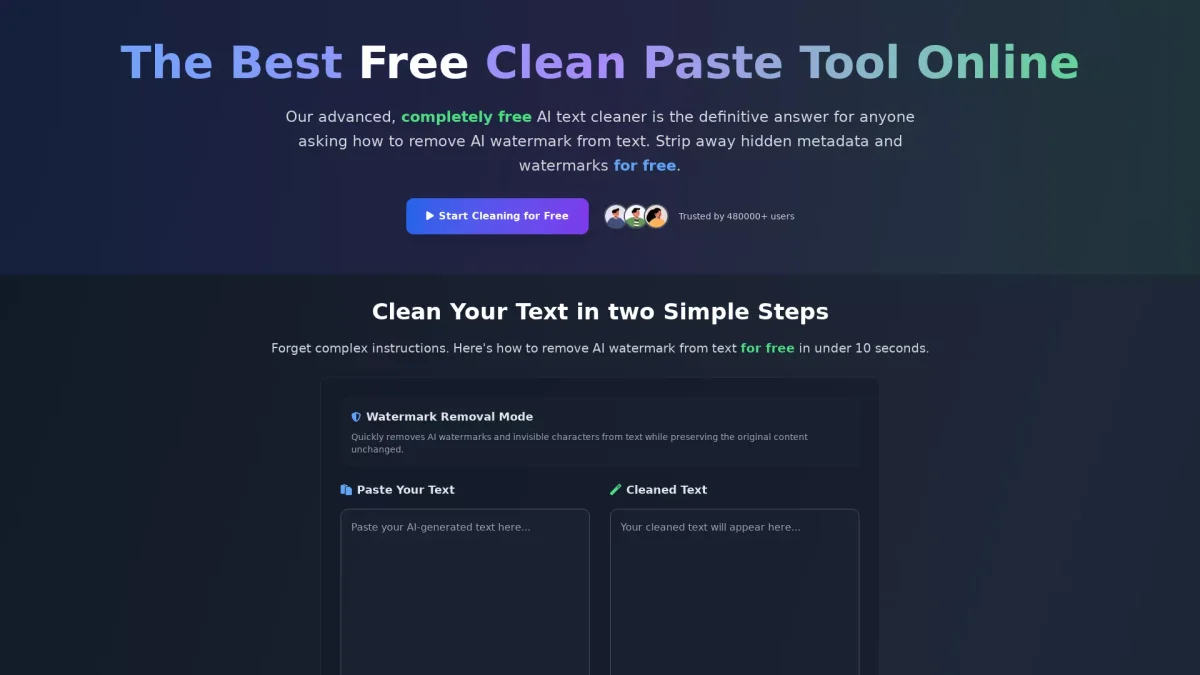
Clean Paste is a free tool that removes invisible characters, hidden metadata, and AI watermarks from text in just seconds without any sign-up required.
What is Clean Paste?
Clean Paste is a powerful online tool designed to strip invisible characters, hidden metadata, and AI watermarks from your text, ensuring that your content appears clean and professional. It solves the common problem of unwanted formatting artifacts that can hinder the readability and authenticity of written work, especially for those using AI-assisted writing tools. Users benefit from Clean Paste's instant processing, allowing them to paste their content and receive cleaned text in seconds. This tool is ideal for students, bloggers, and professionals looking to maintain the integrity of their writing without the worry of hidden characters or formatting issues. With over 480,000 trusted users, Clean Paste is a reliable solution for anyone needing to enhance their text quality effortlessly.
Key Features
- 100% free with no sign-up required
- Real-time auto-paste functionality
- Instant removal of invisible characters
- Strips AI watermarks effectively
- Deep scans for hidden metadata
- Fast processing under 10 seconds
- User-friendly interface for quick access
Who is it for?
- Students and academic writers
- Content creators and bloggers
- Freelance writers and editors
- Professionals using AI tools
- Anyone needing clean text
Use Cases
1. Cleaning Academic Essays
Students can use Clean Paste to ensure their essays are free from invisible characters and hidden metadata before submission. This tool helps maintain academic integrity and enhances the quality of AI-assisted drafts.
2. Preparing Blog Content
Bloggers can utilize Clean Paste to remove unwanted AI watermarks and formatting from their articles. This ensures that the content reads naturally and is less likely to be flagged by plagiarism detectors.
3. Editing Professional Correspondence
Professionals can paste their AI-generated emails or reports into Clean Paste to remove any hidden characters or formatting issues, ensuring that their communications are polished and professional.
4. Enhancing Social Media Posts
Content creators can clean their social media drafts to remove any formatting artifacts that might disrupt the flow of the text, making posts more engaging and visually appealing.
Pricing Plans
Free: No limits on usage, completely free for all features.
Frequently Asked Questions
1. Is Clean Paste really free to use?
Yes, Clean Paste is 100% free with no hidden costs. There are no sign-up requirements or usage limits, allowing anyone to use the tool without restrictions.
2. What types of invisible characters can Clean Paste remove?
Clean Paste efficiently removes all types of invisible characters including zero-width spaces, hidden metadata, and AI watermarks, ensuring your text is clean and ready for use.
3. How quickly does Clean Paste process text?
Clean Paste processes your text almost instantly, typically in under 10 seconds. Just paste your content and click clean for immediate results.
4. Who can benefit from using Clean Paste?
Clean Paste is beneficial for a wide range of users, including students, bloggers, freelance writers, and professionals who need to ensure their text is free from unwanted formatting and AI watermarks.
Clean Paste Reviews & Ratings
Real user feedback and ratings for Clean Paste. See what the community thinks about this AI tool.
No reviews yet
Be the first to share your experience with Clean Paste