AddDeceasedLovedOneToPhoto
Honor Memories with AI Photo Integration
Easily add a deceased loved one to photos using AI, ensuring respectful and natural blending for cherished family memories.
What is AddDeceasedLovedOneToPhoto?
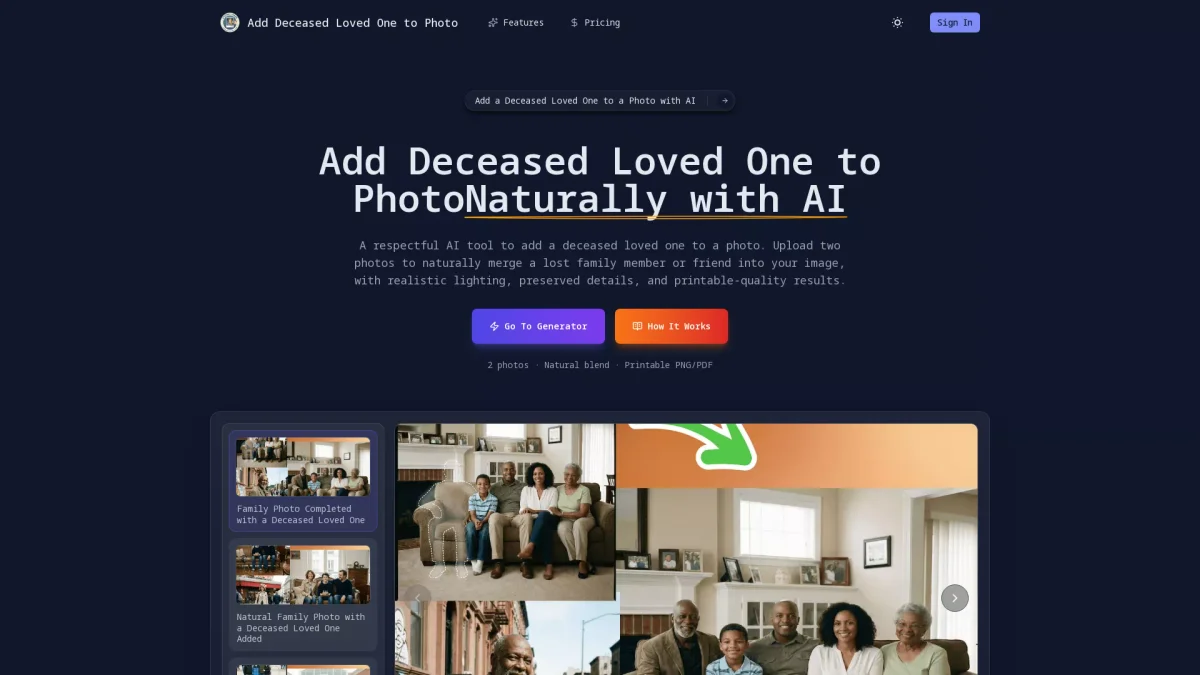
AddDeceasedLovedOneToPhoto is an AI-powered photo editing tool designed to respectfully integrate a deceased loved one into family photos. It allows users to upload two images, ensuring that the final product merges the missing family member seamlessly into the original photo with matched lighting and perspective. This tool addresses the emotional need for families to create complete memories and preserve the presence of those who have passed away. The key benefits of AddDeceasedLovedOneToPhoto include its ability to create high-quality, printable images that maintain the authenticity of the original photo. Users can easily upload their base photo and a clear image of the deceased loved one without requiring advanced editing skills. This tool is perfect for creating meaningful memorials and keepsakes, making it easier for families to honor their loved ones in a respectful and natural manner.
Key Features
- Natural AI-powered photo blending
- Accurate lighting and shadow matching
- Seamless integration with original backgrounds
- High-resolution printable output
- User-friendly interface without editing skills required
Who is it for?
- Families creating memorials
- Grieving individuals and friends
- Photographers and photo editors
- Counselors and support groups
Use Cases
1. Creating Family Portraits
Families can use AddDeceasedLovedOneToPhoto to create complete family portraits that include a deceased loved one, helping to preserve cherished memories and maintain a sense of family unity in photographs.
2. Memorial Keepsakes
This tool allows users to create beautiful memorial keepsakes by adding a deceased loved one into cherished photographs, ensuring that their memory lives on in meaningful and visually appealing ways.
3. Celebrating Special Occasions
Users can enhance special occasion photos by including loved ones who have passed away, making celebrations more inclusive and heartfelt, whether for birthdays, anniversaries, or holidays.
4. Personalized Tribute Photos
AddDeceasedLovedOneToPhoto can be used to create personalized tribute photos for memorial services, allowing families to honor their loved ones in a touching and respectful manner.
Pricing Plans
Pricing information not available on website. Please visit the official website for current pricing.
Frequently Asked Questions
1. How realistic does adding a deceased loved one to a photo look?
The AI technology used in AddDeceasedLovedOneToPhoto ensures that the added loved one is seamlessly integrated into the photo, matching lighting, shadows, and proportions for a natural appearance.
2. What file formats can I download after adding a deceased loved one?
Once the photo is generated, users can download it in high-resolution PNG or PDF formats, making it suitable for printing, framing, or sharing with family members.
3. Can I use old or low-quality photos of a deceased loved one?
Yes, you can use old or low-quality photos of the deceased, but clearer images will yield better results as the AI matches facial features and details for a more authentic blend.
4. Is it respectful to add a deceased loved one to a photo?
Yes, AddDeceasedLovedOneToPhoto is designed to provide a respectful way to include a deceased loved one in photos, helping families honor their memories while preserving the original integrity of the image.
AddDeceasedLovedOneToPhoto Reviews & Ratings
Real user feedback and ratings for AddDeceasedLovedOneToPhoto. See what the community thinks about this AI tool.
No reviews yet
Be the first to share your experience with AddDeceasedLovedOneToPhoto